13 · Output
Laser engraving & artwork export
Export any program as 1:1 SVG, PDF or PNG artwork for a laser engraver.
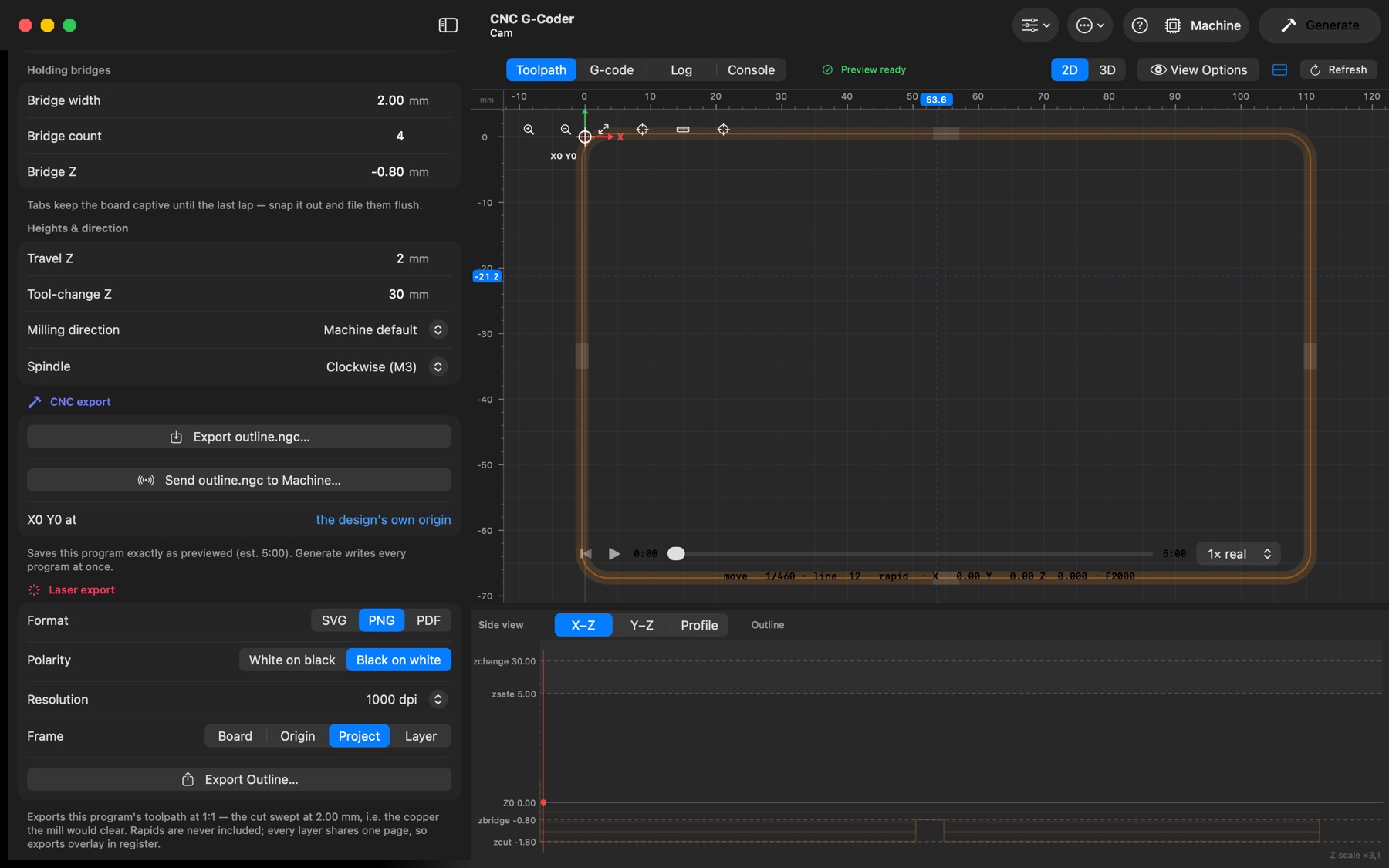
Every program the app generates — copper isolation, outline, drills, mask openings, silkscreen, custom layers — can be exported as artwork at the board's true physical size for a laser engraver: as vector paths (SVG, PDF) a laser can follow, or as a bitmap (PNG). Typical uses: exposing a paint or film resist on the copper for chemical etching, burning the mask openings clear after the mask has cured, and engraving the silkscreen legend.
Where. With a program selected, the Laser export section at the bottom of the sidebar exports that one program (Export <name>…). To export all programs at once, use Generate → Produce: Laser artwork, which writes one file per program into the destination folder instead of G-code. The options are the same in both places and are remembered.
- Format — SVG and PDF stay vector: the toolpath as paths. PNG is a bitmap at the chosen Resolution (300, 600, 1000 or 2400 dpi); the dpi is written into the file so laser software places it at its real size. 1000 dpi resolves a 0.15 mm trace across about 6 pixels. All three come out at the board's true size.
- Polarity — White on black: the cut is white on a black field. Black on white: the inverse. The background is drawn into the file, so the polarity survives import into any laser program.
- Frame — what the page spans. Board: the finished board — the cutout path pulled in by half the cutter, so a 70 × 30 mm board gives a 70 × 30 mm page you can align to the physical PCB. Origin: from X0/Y0 out to the far corner of every program, so placing the file at 0,0 puts it exactly where the mill would cut. Project: that same shared page, cropped to the programs. Layer: this program's own extent only.
- Tool width — with Tool Width on in View Options, the toolpath is swept at the cutter diameter, i.e. the copper the mill would clear; off, it is exported as bare centrelines. Rapids are never included.
Mask openings for ablation. Solder mask → Output: Laser SVGs skips the mask milling programs and instead exports the opening shapes themselves (pads and vias) as 1:1 SVGs through gerbv, ready to burn the cured mask away where parts are soldered.
Silkscreen. Silkscreen → Output: Engrave makes the legend a program (and so exportable as artwork); with Output off the layer is ignored.
What you do with the artwork is your own process; the app does not generate laser G-code or set laser power. Align the file by the Frame you chose: Board to the physical board edge, Origin to the same X0 Y0 you zero the mill at.